

Customer support MCP means connecting your support data to AI assistants like Claude and ChatGPT through the Model Context Protocol, so you can ask questions about it in plain language. The setup guides make it look like the hard part is the connection. For an online casino or sportsbook, the hard part is what the assistant finds when it gets there.
Ask Claude "why are VIP deposits down this month?" with only your helpdesk connected, and it will read tickets. It won't know which of those players are VIPs, what they deposited, or that half of them are waiting on a withdrawal. The answer will sound confident and be mostly about tone.
We build AI agents and player intelligence for iGaming operators, and our copilot, CevroScribe, can be asked questions from Claude and ChatGPT over MCP. This is what we've learned about making those questions worth asking.
See CevroScribe answer questions from Claude →
What is MCP in customer service?
MCP, the Model Context Protocol, is an open standard introduced by Anthropic in November 2024 for connecting AI assistants to outside tools and data. In December 2025 Anthropic donated it to the Linux Foundation's Agentic AI Foundation, and most major AI assistants now support it as clients.
It has two sides:
An MCP server sits in front of a system (a helpdesk, a CRM, a database) and describes the tools an assistant can use: search tickets, fetch a conversation, get a player's account.
An MCP client is the assistant itself (Claude, ChatGPT, and others). You add the server, sign in, and the assistant can call those tools when you ask it something.
In customer service, that means a head of support can ask Claude "what were the top complaints this week?" and Claude goes and looks, instead of someone exporting a CSV on Monday morning.
Does Zendesk have an MCP server?
This is the question most people searching for "zendesk mcp" want answered, so directly: at the time of writing, teams connecting Zendesk to Claude or ChatGPT mostly use third-party MCP apps from the Zendesk Marketplace, or open-source community servers they host themselves. Zendesk's own MCP work has focused on letting its built-in AI reach other systems, which is the client side. Check the current status before you commit, because this area changes month to month.
For an iGaming operator, the more useful question is what a helpdesk-only MCP connection can see. Usually: tickets, ticket fields, users, organisations, help centre articles. That's a lot of text and very little context.
Zendesk MCP with Claude: what it's good for
If your team runs on Zendesk Support, a Zendesk MCP server connected to Claude is a good first step, and it's quick to try. The things it handles well are the support workflows that live entirely inside the helpdesk:
Triage. "Show me unassigned tickets older than two hours in the VIP group, and summarise each one." Claude reads the tickets and gives the team lead a short list to work from.
Ticket summaries before a handover. A shift lead can ask for a summary of every open escalation before the evening rota takes over.
Help centre checks. "Which help centre articles mention the old 35x wagering rule?" is a question a helpdesk connection answers well, because the answer lives in the helpdesk.
Reviewing Zendesk automations and triggers. Some servers expose automations, triggers and macros, so an admin can ask which automation sends a given email or which trigger routes a given form. Treat any write access here carefully. A Claude agent that can create or edit automations can also break your routing on a Saturday afternoon.
What it won't do on its own is connect a ticket to the player behind it. The ticket says "withdrawal". It doesn't say the player is a Diamond VIP with €40,000 in deposits this quarter and a payout held for a source of funds check. That's the gap the rest of this guide is about.
What we see in the first weeks
Most operators we connect start the same way. The first questions are reporting questions: top drivers, volume by market, sentiment this week versus last. They're answered in seconds, and a weekly report somebody built by hand quietly stops being needed.
The second wave is sharper. A VIP manager asks about one player before a call. A CRM lead asks what players said about a promotion two days after it launched, instead of waiting for the end-of-month numbers. Someone in payments asks how many contacts a PSP outage caused and in which markets.
The third wave is where it pays off: the questions turn into changes. A driver shows that the AI agent is promising payout times it can't keep for one payment method. Scribe drafts the change to that AI Procedure, a support lead reviews it, and it goes live the same afternoon. The agent's guardrails (preconditions, forbidden actions, escalation to a human with full context) stay in place the whole time.
What slows teams down is almost never the MCP connection. It's agreeing on the driver list, deciding who can see what, and getting payments and KYC data joined up. Do those first and the assistant becomes useful very quickly.
What a helpdesk-only connection misses in iGaming
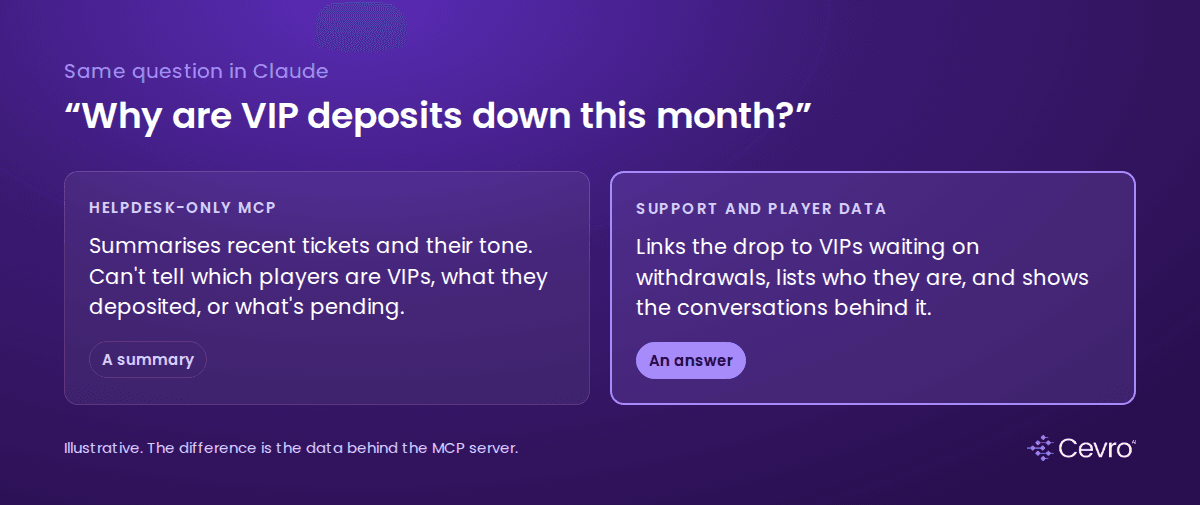
Same question, two very different sets of data behind it.
A support ticket in iGaming rarely makes sense on its own. The facts that explain it sit somewhere else:
What the assistant needs | Where it usually lives |
|---|---|
Is this player a VIP? What tier, which host? | CRM or VIP tool |
What did they deposit last month? | PAM / back office |
Is a withdrawal pending, and why? | Payments, PSP |
Is a document request open? | KYC provider |
Any RG flags or limits? | Back office, RG tooling |
What's the real reason they contacted us? | The whole conversation, read end to end |
With a helpdesk-only MCP server, Claude can summarise what players said. It can't tell you which of them matter most, whether the complaint is justified, or what it's costing you. You get well-written summaries of tickets. Useful for triage. Not much use for a VIP manager deciding who to call today.
The other gap is interpretation. Raw tickets carry agent tags, which drift and rarely match the real reason for contact. An assistant reading them will repeat the same mistakes your reports already make. We wrote about this in detail in our guide to contact driver analysis.
Questions worth asking over MCP
When the MCP server sits in front of support data that has already been joined to player data and structured into drivers and sentiment, the questions change. These are the ones iGaming teams ask us most:
Head of VIP
"Which VIPs are most at risk this week, and why?"
"Which Diamond players raised a withdrawal delay in the last seven days and haven't deposited since?"
Head of CS or Ops
"What were the top contact drivers this week, and which ones grew?"
"Why did chat volume jump on Saturday?"
CRM and retention
"What's behind the bonus disputes since the 12 September offer?"
"How did sentiment change after we cut wagering to 30x?"
Payments and compliance
"How many contacts this week were about source of funds requests, by market?"
"Show me conversations where a player mentioned self-exclusion and wasn't routed to the RG procedure."
Each of these needs at least two systems. That's the point of doing it over MCP from an assistant your team already uses, instead of opening four tools.
How customer support MCP works with CevroScribe
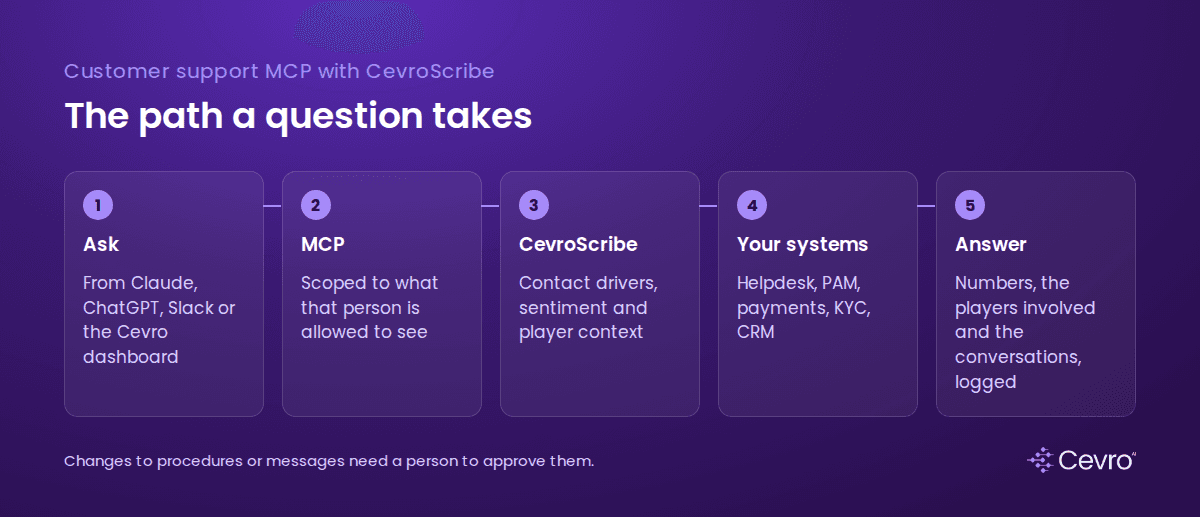
The path a question takes, from the assistant to an answer with the players attached.
CevroScribe is the part of Cevro you talk to. It sits on top of the conversations our AI agent and your human agents handle, joined to the back-office data we already integrate with for support: player tier, deposits, withdrawals, KYC status, bonuses and RG flags.
You can ask it from the Cevro dashboard, from Slack, or from Claude and ChatGPT through MCP. Every question goes through the same layer, so the answer in Claude matches the answer in the dashboard. It comes back with the numbers, the players involved and the conversations behind it.
Some things it can also do, with your team approving each change:
Send an at-risk VIP list to the hosts' Slack channel.
Draft a change to an AI Procedure when a driver shows the AI agent handling something the wrong way.
Update knowledge base answers when a promotion's terms change.
Security and permissions
Connecting player data to an AI assistant is a reasonable thing to be careful about. What we check with operators before switching it on:
Scope. Decide which teams can ask what. A CRM analyst doesn't need to see KYC documents. Permissions should follow the person, in the assistant as in the dashboard.
PII. Cevro masks personal data and runs with zero data retention. Your assistant sees player IDs and tiers where it needs them. Passport scans stay where they are.
Writes need a human. Reading is one thing. Anything that changes a procedure, sends a message or touches an account should need a person to confirm it.
Audit. Every question and every action should be logged with who asked. Cevro is SOC 2 Type II certified and logs every interaction.
If you're using a community MCP server for your helpdesk, check who maintains it, where it runs and what it logs. The tool list is the easy part to review. The hosting is where the risk sits.
What operators get wrong with MCP
Connecting the helpdesk and stopping. It's the fastest win and it plateaus quickly. Without player value and payments data, every answer treats a first-time depositor and a Diamond player the same.
Letting the assistant invent the categories. Ask an assistant for "the main complaint themes" and it will produce a new set of themes every time. Fix your contact drivers first, then let the assistant query them.
Treating it as a reporting project. The best use we see is the Monday question from a VIP manager that used to take an analyst half a day. Start with three questions a real person asks every week. Build from there.
Getting started
Write down five questions your support, VIP and CRM leads ask every week, and who currently answers them.
List the systems each answer needs. If most need more than the helpdesk, a helpdesk-only MCP server won't get you there.
Decide permissions per team before anyone connects anything.
Try the questions against a connected setup and compare the answers with what your analyst would have said.
Book a demo to try CevroScribe from Claude →
FAQ
What is customer support MCP?
Customer support MCP means connecting support data to AI assistants such as Claude or ChatGPT through the Model Context Protocol, an open standard, so teams can ask questions and take approved actions in plain language.
Does Zendesk have an MCP server?
At the time of writing, teams connecting Zendesk to Claude or ChatGPT mostly use third-party MCP apps from the Zendesk Marketplace or open-source community servers. Check current status, as this changes often.
Can I connect Zendesk to Claude?
Yes, through an MCP server that sits in front of your Zendesk account. The assistant can then search and read tickets. For iGaming questions about player value or payments, it also needs access to back-office data.
What is the difference between an MCP server and an MCP client?
An MCP server exposes a system's data and tools to AI assistants. An MCP client is the assistant, such as Claude or ChatGPT, that connects to servers and calls their tools.
Is it safe to connect player data to an AI assistant?
It can be, with scoped permissions per team, masked personal data, human approval for any write action and a full audit log. Check how any third-party MCP server is hosted and what it stores.
What questions can iGaming teams ask over MCP?
Common ones are which VIPs are at risk and why, what the top contact drivers were this week, what's behind a rise in bonus disputes, and how sentiment changed after a promotion or policy change.
Can I ask CevroScribe questions from Claude or ChatGPT?
Yes. CevroScribe answers questions about contact drivers, sentiment and at-risk players from the Cevro dashboard, from Slack, or from Claude and ChatGPT through MCP.